Bitcoin Inheritance Guide
How to make bundles, place them with guardians, and recover
Overview
Bitcoin Inheritance keeps the instructions around your bitcoin safe until the day someone else needs them. You choose the people who hold the pieces, and how many of them must agree before anything opens.
It encrypts your files with age into one archive, splits the key into pieces with Shamir's Secret Sharing, and gives each guardian one self-contained bundle. A bundle holds the encrypted archive, one piece of the key, and the recovery tool.
Recovery is opening one file in a browser. It needs no server, no account and no internet connection, and it works if this website is gone. The one exception is a time-locked bundle, which needs a brief connection to check the date. See Time-Delayed Recovery.
This site has two tools:
- The guardian bundles, made on the Create Bundles page and opened on the Recover page. They hold files: your estate letter, your wallet descriptor, where your steel backups are, who to call.
- The descriptor backup, made in Create Bundles and read back on the Read a Descriptor Backup page. It is for multisig wallets only. It puts an encrypted copy of your wallet's descriptor on the Bitcoin chain, where nobody can lose it. See Descriptor Backup on Bitcoin.
Both tools are free and run in your browser. Bitcoin Butlers also offers them with a Butler on a video call. A placement session ends with a tested recovery and a completed estate insert. An annual drill rehearses the recovery every year. A descriptor backup puts a multisig descriptor on the chain while you watch. The Butler guides. Your files stay on your machine, and no Butler ever holds a bundle.
Why Bitcoin Inheritance
Your seed words belong on steel or in a codex32 kit, offline, and nothing here changes that. The problem is everything around the seeds. Your family needs to know that a wallet exists, where the backups are, which software opens it, what the descriptor is, and who to call. Today one person holds all of that knowledge.
The common ways to pass it on each have a failure mode:
- One person holds everything. One accident, one falling out or one theft, and it is gone or exposed.
- A sealed envelope with a lawyer. One copy in one office. Whoever opens it reads everything.
- A will. A will becomes a public record, and probate is slow.
- A password manager's emergency access. The company has to exist and cooperate on the day, and one person gets everything.
- Files split by hand. Confusing, error-prone, and usually not encrypted.
Bitcoin Inheritance works differently:
- Several people must agree. No guardian can read anything alone, and no single loss ends the plan.
- Nothing to keep running. Recovery is one file in one browser. There is no server to keep alive and no company that has to exist.
- Written for the person who opens it. Each bundle explains what it is, what it cannot do alone, and where to look for the other guardians. The reader needs no help from you.
Creating Bundles
Three steps, all in your browser. Your files never leave your device. Open Create Bundles to begin.
Step 1: Add Guardians
Add the people who hold one piece of the key each. Give each one a name and, if you want, a way to reach them.
These names go nowhere but each guardian's own bundle. A guardian sees their own name and nobody else's. That is deliberate: a bundle travels, and a list of names travels with it, so a bundle in the wrong hands would name the rest of the people to approach. Write the list of guardians on your estate insert instead, where your heirs will find it and no guardian will. To anyone who reads that list early it is names and nothing else. To your heirs it is the only way to find the bundles.

Then set the threshold: how many guardians must come together to recover the files.
- 3 guardians, threshold 2: the simplest setup. A couple and a lawyer is a common choice.
- 5 guardians, threshold 3: a good balance for a wider family.
- 7 guardians, threshold 4 or 5: harder to collude, more people to coordinate.
The guardians never learn each other's names. That is the default and there is no way to turn it off.
Step 2: Add Files
Drag in the files or the folder you want to protect.

Good candidates:
- An estate letter: your own letter to your family about what you hold, where it is, and what you want done with it
- Your wallet descriptor, or a wallet export, so the wallet can be rebuilt
- The extended public keys of each cosigner
- Where each steel backup or codex32 kit is kept, and who has access to it
- Which software and which devices open the wallet
- Who to call: your Butler, your lawyer, your accountant
- Recovery codes for a password manager, and where the legal documents are
Step 3: What Your Heirs Need To Know
A bundle full of files tells your heirs nothing about what to do with them. This step is where you write that down, in your own words.
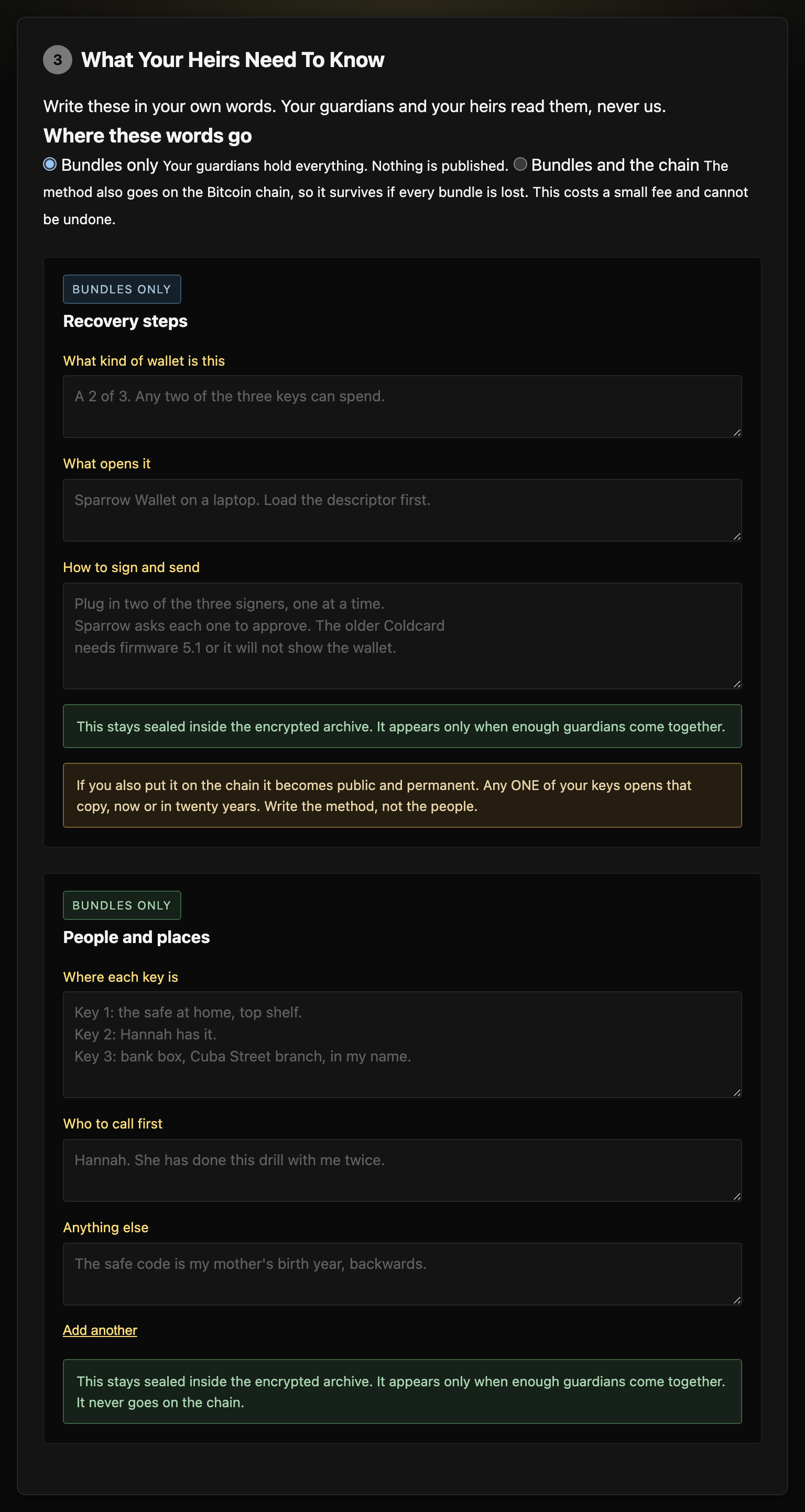
The page asks six questions in two groups.
How the wallet works. What kind of wallet it is, how many keys it takes to spend, which software opens it. This is the method.
Where the keys are. Which drawer, which safe, which person holds one. This is the part that dies with you, and it is the reason your heirs are stuck without it.
The two groups are kept apart on purpose, because they do not travel the same way.
- The method goes into every bundle, and onto the chain if you ask for it.
- Where the keys are goes into the bundle only, in a file called
WHERE-THE-KEYS-ARE.txt, sealed inside the encrypted archive. It never goes on the chain. A list of where your keys live is the last thing that should be public and permanent.
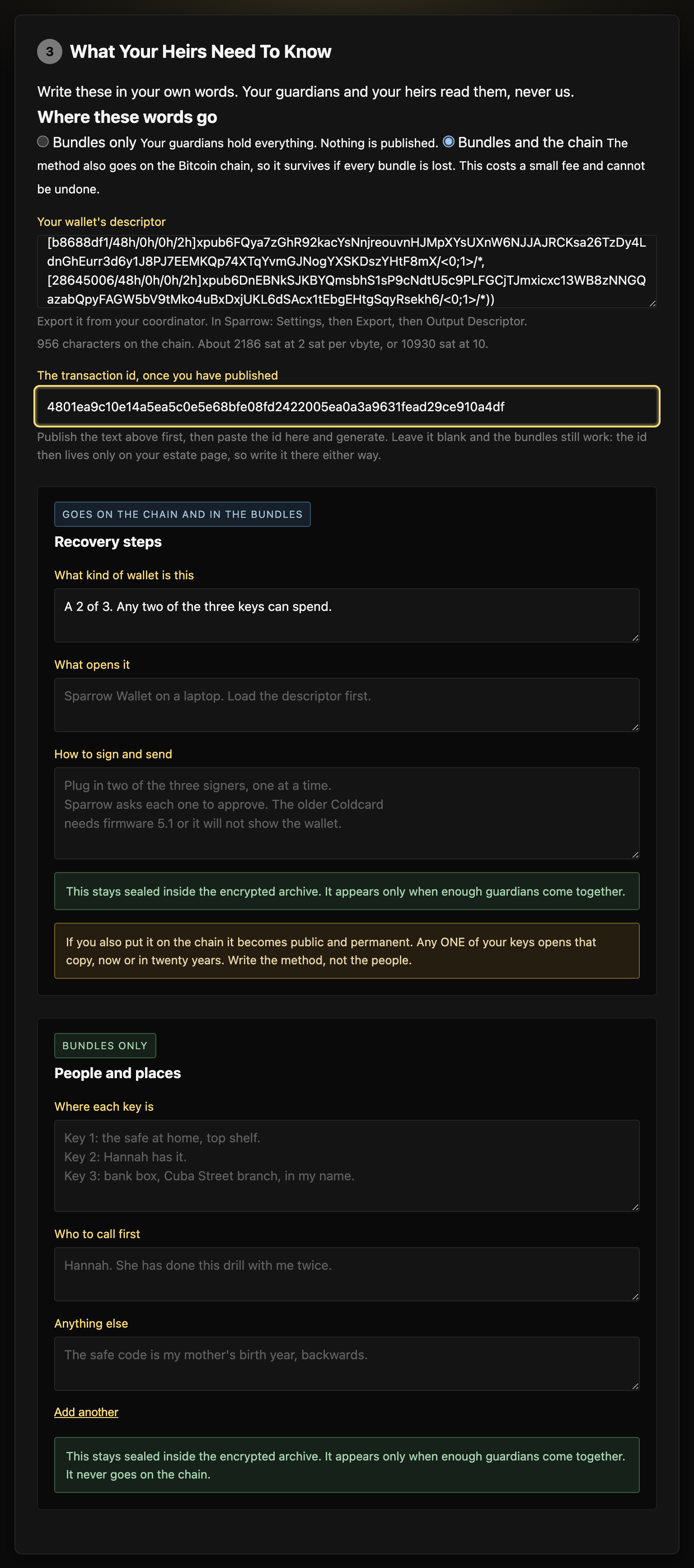
Under the questions you choose where the method goes: bundles only, which is the default, or the bundles and the chain. Choosing the chain opens a box for your wallet's descriptor and shows you what it will cost, in characters and in sats, as you type.
You can leave all of it blank. The bundles still work. They will not tell anyone what to do with them.
Step 4: Generate Bundles
Click Generate Bundles. The page encrypts your files and makes one bundle for each guardian.

Each bundle contains the full recovery tool. It works if this website is gone.
Two options live in this step:
- Owner key (optional). Gives you a way to open your own backup alone, without calling the guardians. See Owner Key.
- Advanced: Add a time lock. Keeps the files closed until a date you choose, even if the guardians combine their pieces early. See Time-Delayed Recovery.
Distributing to Guardians
Hand each guardian their bundle by the most private route you can manage. In order of preference:
- In person. A USB stick or a microSD card, or the printed
README.pdf, handed over directly. Label the media with the guardian's name and the year only. Never write the word bitcoin on it. - An encrypted messenger. Signal or another end-to-end encrypted messenger.
- Email or a cloud drive. Avoid these for handing out bundles. The provider keeps a copy, and your account becomes a place where every piece can be collected.
If you send a bundle by email or messenger, delete it from your sent folder. Do this once the guardian confirms they have it. An account that holds every piece undoes the split.
After Creating Bundles
Before you put this away, do these things:
- Check that each guardian has their bundle and can open its
recover.html. - Tell each guardian what they hold, why they hold it, and that it does nothing alone. They need the others.
- You need no separate copy of the encrypted archive. Every guardian's bundle carries it, and it is useless without enough pieces.
- Save your
project.yml, so you can make new bundles later. See About project.yml. - Print
README.pdffor each guardian. Paper needs no adapter, no power and no working device. - Fill in an estate insert and keep it with your will. It is one printed page. It names the guardians, where each bundle lives, and how to start a recovery. It holds no secrets. The estate letter goes inside the bundles. The estate insert stays outside them. There is a template in the source repository.
- Set a yearly reminder. See Keeping Bundles Current.
- Run a recovery drill. It is the only way to know that the plan works.
Recovering Files
If you are reading this because someone has died or can no longer act, there is no time limit. The bundles do not expire. Work through the steps at your own pace, and ask the other guardians for help along the way.
You may have a bundle already. If not, open the Recover page directly and add the pieces as you collect them from the other guardians.
What Guardians Receive
Each bundle is a ZIP file with these files inside:
Each bundle is made for its guardian. Your piece is already inside your recover.html. It names you and no other guardian, and it tells you to look for that list with the owner's will. When the encrypted archive is 10 MB or smaller, it is inside your recover.html, and the bundle has no separate MANIFEST.age.
Nothing the owner wrote is in the bundle's plain files. What they wrote in Step 3 is sealed inside the encrypted archive, so it appears only after enough guardians combine their pieces:
A guardian holding one bundle reads none of these, and neither does anyone the bundle is forwarded to. The README.txt says only whether the owner wrote anything at all.
Path A: I Have the Bundle ZIP
The simplest path. You have the bundle ZIP, or the files from it.
Extract the ZIP and open recover.html
Open it in any modern browser. Your piece is already loaded.
Add the encrypted archive
For archives of 10 MB or less this is automatic, because the data is inside the page. Otherwise, drag MANIFEST.age from the bundle onto the page.
Find the others
Your bundle does not name them. The owner kept that list with their will or estate papers, and the page tells you to look there. Ask each guardian for their README.txt, or for their words over the phone. Show them the estate page: it names them, which is how they know the request is genuine.
Add their pieces
For each guardian: drag their README.txt onto the page, paste the text, or scan the QR code on their PDF. A check mark appears as each piece is accepted.
Recover the files
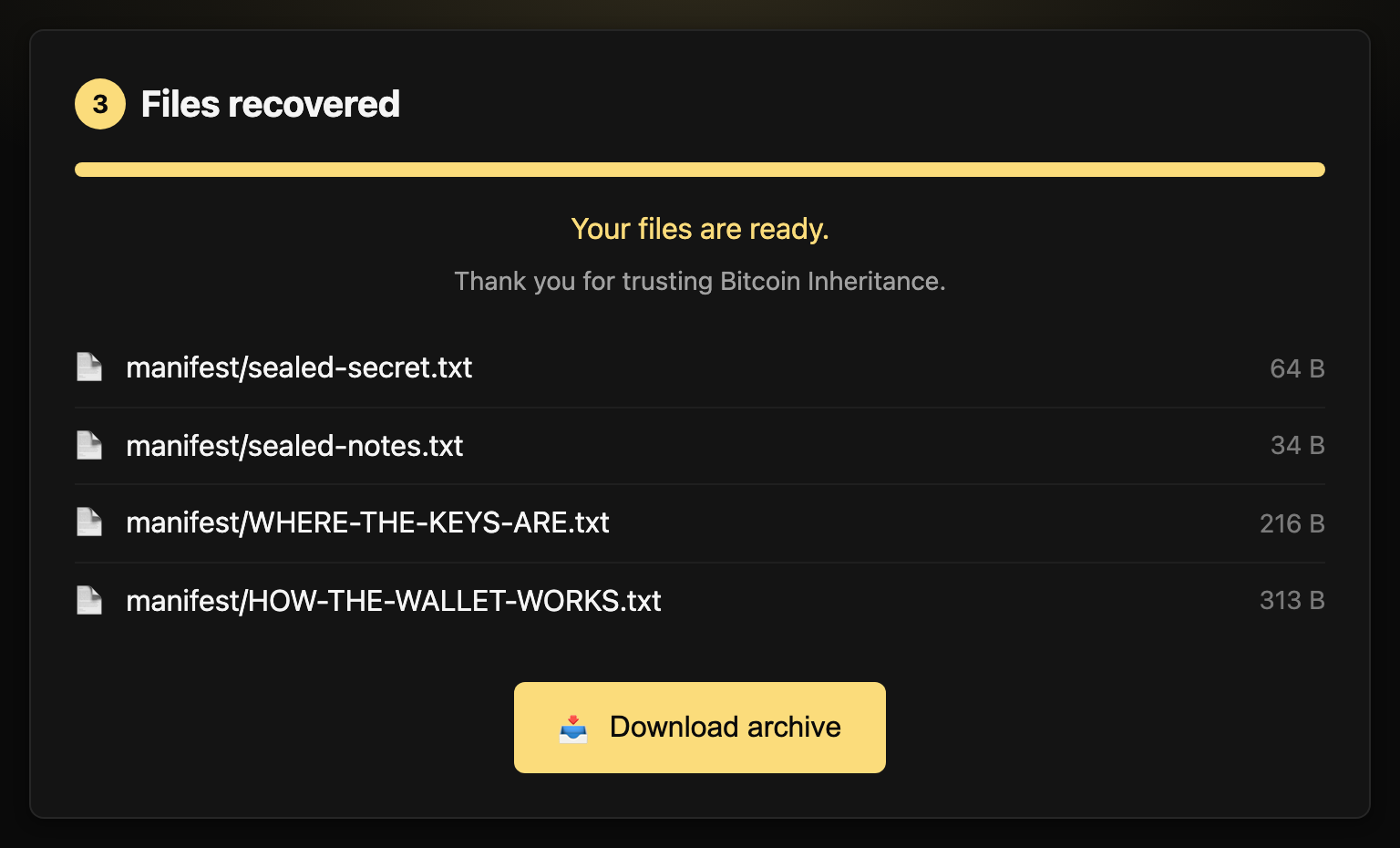
When enough pieces are in, recovery starts on its own. The files open in your browser, and you can download them. If nothing happens, click Unlock and Recover.
.zip bundle, drag it onto the page. The piece and the archive are both read from it.


Path B: I Have a Printed PDF with Words
Each printed PDF carries your piece as a numbered list of words. Type them into the recovery tool. No camera or scanner is needed.
Open the recovery tool
Open the address printed on the PDF, or open recover.html from any guardian's bundle.
Type in your recovery words
Choose Paste a piece or type recovery words. Type the words from your PDF, separated by spaces. You do not need the numbers.


Add the encrypted archive
The page also needs the encrypted archive. Ask any guardian for one file from their bundle: MANIFEST.age if their bundle has one, otherwise their recover.html, which carries the archive inside it. Drag the file onto the page or click to browse.
Collect pieces from the other guardians
Find them on the owner's estate page, then ask for their pieces. They can send their README.txt, read their words to you over the phone, or show you their QR code. No bundle names them, so that page is where the list lives.
Recover the files
When enough pieces are in, recovery starts on its own. If nothing happens, click Unlock and Recover.
Path C: I Have a Printed PDF with QR Code
If your device has a camera, scan the QR code on the PDF to load your piece directly.
Open the recovery tool
Scan the QR code with your phone camera. It opens the recovery tool with your piece filled in. Or open the address on the PDF and type the short code printed under the QR code.


Add the encrypted archive
The page also needs the encrypted archive. Ask any guardian for one file from their bundle: MANIFEST.age if their bundle has one, otherwise their recover.html, which carries the archive inside it. Drag the file onto the page or click to browse.

Collect pieces from the other guardians
Find them on the owner's estate page, then ask for their pieces. They can send their README.txt, or you can scan their QR code.
Recover the files
When enough pieces are in, recovery starts on its own. If nothing happens, click Unlock and Recover.
- It works offline. Only a time-locked archive needs a connection, to check the date.
- Nothing leaves the browser.
- The guardians can be anywhere. They send their
README.txt, or read their words to you.
If You Are the Owner
If the bundles were made with an owner key, you can recover alone. Drop any one bundle onto the Recover page. Open I am the owner and have my owner key and paste your secret key. See Owner Key.
If the Page Will Not Open
The files can be recovered without this tool. A technical person can do it with age and a short Python script from the source repository, using only the pieces and the encrypted archive. The steps and the test files are in Independent recovery.
Descriptor Backup on Bitcoin
This tool is for multisig wallets, and it solves a different problem from the bundles.
A multisig wallet needs two things to spend: enough keys, and its descriptor. The descriptor lists every key in the wallet and says how they fit together. If you still hold every key, the descriptor can be rebuilt with some work. Lose one key and the descriptor together, and the keys you still hold cannot rebuild the wallet, even when they are enough to sign. A 2 of 3 with two keys and no descriptor is locked.
Create Bundles encrypts the descriptor so that your own keys open it, when you choose to put your words on the chain. Then it gives you one line of text to put into one OP_RETURN output on the chain. After that, your keys are enough again. The text stays on the chain as long as Bitcoin does, and nobody can delete it.
How to Make One
The descriptor backup is made in Create Bundles, in the same step where you write what your heirs need to know. It is not a separate page any more. Read a Descriptor Backup only reads one back.
- Work through steps 1 and 2 as normal: guardians, then files.
- In step 3, answer the questions about your wallet, then choose the bundles and the chain as the destination.
- Paste your descriptor into the box that appears. The page reads it back: the threshold and the derivation path. Check that they match your wallet. It also shows the size and what the chain fee will cost at two fee rates.
- Put it on the chain, in one of two ways. Pay opreturnbot.com to publish it, ticking Private, or send it from your own Bitcoin Core node. Both put the same text into one OP_RETURN output.
- Paste the transaction id back into the page, then generate. Publishing before you generate is the only way the id reaches your guardians. The archive is encrypted and its key is split among them the moment you generate, so an id you find afterwards can never be added to it. Write it on your estate page as well, because the copy inside the archive needs enough guardians to open.
- Read it back. Open Read a Descriptor Backup, paste the transaction id, add your keys, and watch the descriptor come back. Publishing alone proves nothing. This step proves the backup landed.
If you have never seen this work, that page has a button that does the whole read-back with our own published backup. It costs nothing and moves no coins.
Who Can Open It
You choose, and the choice matters:
- Your wallet's threshold. The same number of keys it takes to spend. A 2 of 3 wallet needs two keys to open the backup. This matches your wallet exactly, so the backup is never harder to open than the money is to spend.
- Any one of your keys. One key opens it. Easier to recover, and easier for anyone who gets hold of a single key. This follows the draft BIP-138 format, which other wallets are beginning to read.
What Is Public
The text goes into one OP_RETURN output. It is public and permanent. The page encrypts the descriptor before it goes there, and only your keys open it. What an observer can read without your keys depends on the format you chose.
- Threshold backup. The page encrypts your extended public keys and their fingerprints. It writes the structure of the wallet in plain text in front of the encrypted part: the script type, the threshold and the derivation paths. For a 2 of 3 the text begins
wsh(sortedmulti(2,[48h/0h/0h/2h]<0;1>/*,.... That plain part is what lets multisigbackup.com read the backup with no software from us. After the encrypted part come short lookup tags, one per pair of your fingerprints. The tags let someone who already holds two of your keys find the backup, and they reveal nothing else. - One-key backup (BIP-138). The whole descriptor is inside the encryption, script type and threshold included. In plain text there is the marker
BIP138, a list of entries, and any derivation path outside the common set. Each real entry is derived from one of your keys and is not the key itself. The page pads the list with random entries, up to 5, 10 or 20. These are the counts the standard asks for. A wallet with three keys writes five entries. A wallet with seven keys writes ten. The count then does not show how many keys your wallet has, and nothing tells the entries apart. The page leaves out the standard multisig paths, so an observer cannot tell the script family.
In both formats anyone can see that a wallet backup exists. In neither can anyone read a key without your keys. That is the trade, and it is deliberate. A backup that only you can find is lost when you are gone. This one remains after you, after us, and after the guardians.
How to Recover It
Choose Recover a descriptor. Give the page the text. Or give it the transaction id, and it fetches the text from a public explorer. Then paste the wallet's extended public keys, as many as your choice above requires. Any of your signing devices can produce its extended public key from its seed. Click Rebuild my descriptor.
Keep the transaction id on your estate insert. It is the fastest way in. If the id is lost, a technical person can still find a threshold backup. The text carries a short tag built from any two of your wallet's fingerprints, and the chain can be searched for it. This page has no search of its own.
Recovery Without This Page
Neither format is ours to own, and that is the point. A threshold backup uses the published multisig-backup format. A one-key backup follows draft BIP-138. Both are open specifications with other software already reading them, so a technical person can rebuild your descriptor with no Bitcoin Butlers involved.
Your estate insert names the tool to use and how to reach it. Someone reads that page after Bitcoin Butlers is gone. Our own test vectors are in the source repository for anyone who wants to check the formats match, byte for byte.
The Argument Against This
Serious people think writing a backup onto the chain is the wrong thing to do. Here is their case, in their own words.
Pieter Wuille, who has contributed to Bitcoin Core for over a decade, put it plainly in 2025: "I don't feel like using a globally replicated database for information that just a single person cares about is a good use of the technology. It may appear convenient at times when demand for block space is low, but I would caution against building an expectation that this is a realistic option in the long run."
He is right on both counts. Every node on earth stores your backup forever, and nobody but you needs it. Cheap block space today is a poor thing to build a twenty-year plan on.
Read what he proposed instead, because it matters here: "You need backups for other data anyway, and it ought to be trivial to hide this amount of data in your backups in a plausibly deniable way too."
That is what the guardian bundles are. They are the main path, and every bundle carries the same text the chain does. So the ordinary way your heir recovers has nothing to do with the chain at all.
The chain copy answers one question the bundles cannot: what happens when every bundle is gone. Houses burn, guardians move, drawers get cleared out by people who do not know what they are looking at. Whether that risk is worth a permanent public record is your call, and you can take the bundles alone.
One more thing about Wuille, because half a quotation is worse than none. He argued in favour of dropping Bitcoin Core's limit on this kind of data, and against node operators deciding what belongs in a block. He thinks it is a poor use of the chain. He does not think anyone should stop you.
Never Put Seeds Here
The page takes a descriptor and nothing else. Seeds belong on steel or in a codex32 kit, never on a public chain.
Best Practices
Choosing Guardians
- Longevity: people who are likely to be reachable in ten years
- Spread: not all in one house, one town or one branch of the family
- Technical ability: any mix. The tool is written for everyone.
- Relationships: they must be willing to work with each other when the time comes
- Trust: a single piece reveals nothing, but each guardian carries a duty
- Professionals: a lawyer or an accountant can be one guardian. A Butler cannot. Bitcoin Butlers never holds a piece.
Security Considerations
- Do not keep all the bundles together. That undoes the split.
- Print
README.pdf. Paper needs no drive and no battery. - Save
project.ymlif you want to make new bundles later. - Between updates, keep your source files in an encrypted vault such as Cryptomator or VeraCrypt. Do not leave plain copies in a normal folder.
Storing Bundles Safely
A bundle is small, in most cases under 10 MB, and it is encrypted. What matters is that each guardian keeps their own, and that no single place holds them all.
- Paper is the most durable copy.
README.pdfholds the piece as words and as a QR code, and it needs no device. - USB sticks and microSD cards work, with two cautions. Connectors change, and flash memory loses data when it sits unpowered for years. Check them at every drill, and replace them every five years or at the first read error.
- Email and cloud drives keep a copy for as long as the account lives. Use them as a guardian's second copy only, never as the place where every bundle collects.
More than one copy, in more than one form: paper plus a card, or paper plus the guardian's own cloud drive.
Keeping Bundles Current
Once a year, contact every guardian. Confirm that they still have their bundle, that it still opens, and that their contact details are current. Correct them on your estate insert, because that page is now the only place those details live.
Any change means new bundles for everyone. Not for the guardians affected. For all of them.
Each time you generate, the page makes a brand new recovery key and splits it again. One guardian's old piece and another guardian's new piece cannot be combined at all. So if three of your five guardians swap their bundle and two do not, you no longer have a 3 of 5. You have a 3 of 3, and nothing on the outside of any bundle shows it.
An old bundle still opens. It still looks right. It counts for nothing. That is why the swap matters more than it sounds.
Write down who holds what and when they got it, so that the day you revise you know exactly what to collect. The estate insert has a column for it.
The chain copy is different, because it cannot be changed. Once your descriptor is on the chain it is there for good. That is the point of it.
- If your words changed and the wallet did not, do nothing on the chain. Your new bundles carry the new words, and the chain copy still tells the truth about the method.
- If your wallet changed, a new cosigner or a new device, the chain copy now names a wallet that no longer exists. Publish a new one and write the new transaction id on the estate insert. The old one stays on the chain forever and that is fine, as long as the insert says which is current.
If a bundle and the chain copy ever disagree, use the bundle. The bundle is the newer copy, and it carries its own date. The chain copy is for the day every bundle is gone.
Recovery Drills
Nobody tests a backup plan until they need it. A drill tests it earlier, while a problem is cheap to fix. Run one a year:
- Contact every guardian. Each one confirms that they still have their bundle, where it is, and that the media reads.
- Media check. Each guardian opens the ZIP and confirms that
README.txtandrecover.htmlopen. - Rehearsal recovery. The needed number of guardians recover the files on one guardian's own computer, with
recover.html, offline. Choose a different group each year. - Read the descriptor back. If you have a descriptor backup on the chain, open the Descriptor Backup page. Enter the transaction id from the estate insert. Rebuild the descriptor with your keys. It takes two minutes.
- Check freshness. If the wallet or the files changed since the last drill, the bundles are stale. Make new ones.
- Sign the drill record on the estate insert. Write the date, the guardians confirmed, the group that recovered, and the version of the files.
A failed drill is a good result. You found the problem before it mattered.
For a first drill, a test set with a harmless file works well: a photo, a recipe. Hand out the pieces and let the guardians recover it without your help. What you learn: whether they can find their bundles, whether the instructions are clear to them, and whether they can reach each other without you.
Bitcoin Butlers runs this drill with you and your guardians over video, once a year: the annual drill.
Revoking Access
Once you hand out a piece, you cannot take it back. There is no server and no central authority, so nothing can revoke it.
If you need to change who holds pieces:
- Make new bundles with the new set of guardians. The key is new too.
- Hand out the new bundles to the guardians you keep.
- Ask every remaining guardian to delete their old bundle and keep only the new one.
The same applies when the files change. New bundles mean a new key and new pieces. Old pieces cannot open the new archive. They still open the old one. Check that no guardian keeps an old copy.
About project.yml
When you make bundles, the page saves your project in a project.yml file. It stores:
- The guardians' names and contact details. These stay on your own machine. No bundle carries them.
- Your threshold, for example 3 of 5
- A hash to check that a set of bundles belongs together
- Checksums to check that a bundle is intact
It stores no secrets: no passphrase, no key material, no file contents. It is safe to keep with your other project files.
With project.yml you can make new bundles for the same guardians, check existing bundles, and see the state of your setup.
Understanding the Security
Bitcoin Inheritance combines well-reviewed tools. It invents no ciphers of its own. This is what that means in practice.
Who Can Read What
Three tiers, and there are no others. Every sentence elsewhere in this guide has to agree with this table.
| Who | What they can read | |---|---| | One guardian, on their own | Their own piece. Their own name. The project name. That more pieces are needed, and how many. Nothing else: not another guardian's name, not how your wallet works, not where a key is. | | Enough guardians together | Everything you sealed: your files, how the wallet works, where the keys are, and the chain copy. | | Anyone holding one of the wallet's own keys, plus the transaction id | The chain copy alone, so how the wallet works and the descriptor. No guardian is involved, and no key is revealed. This is the path for an heir who cannot gather enough guardians, and the id comes from your estate page. |
Two things follow that are easy to miss.
A guardian cannot tell how large your holdings are, who else you trusted, or whether your wallet is a single key or a multisig. Forwarding their whole bundle to a stranger gives that stranger no more than the guardian had.
The third tier depends on the transaction id. A bundle carries it only if you published before you generated, and even then it is sealed behind the threshold, which is what that tier exists to avoid needing. So the estate page is the copy that matters. Write it there.
What Protects Your Data
Bitcoin Inheritance encrypts your files with age, a modern tool that is widely reviewed and has no known weaknesses.
The key that locks them is 256 bits long, taken from your operating system's random number generator. Guessing it is out of reach in any span of time that matters.
Where a passphrase is involved, scrypt makes each guess slow on purpose. Trying many passphrases then costs millions of times more than it otherwise would.
Shamir's Secret Sharing splits the key into pieces. Fewer pieces than the threshold hold no information about the key at all. That is a property of the mathematics, and more computing power does not change it.
Each bundle carries checksums, so the recovery tool can tell when a piece is damaged or altered.
For the details, see the security review in the source repository.
What Could Go Wrong
recover.html still works, because it is self-contained. The descriptor backup still reads back, because its formats are public. Nothing depends on us.
README.txt explains everything. Your guardians do not need to remember anything. It is all written down for them.
Two things do need to be true. You trust the device that makes the bundles, and nobody has compromised the browser that recovers the files. These are the same assumptions you make when you use a computer for anything that matters.
How It Compares
Bitcoin Inheritance is one of many tools that split a secret with Shamir's Secret Sharing. This is what sets it apart:
- It holds files. Most Shamir tools split a password or a short text. Bitcoin Inheritance encrypts whole files and folders: your estate letter, your descriptor, your instructions.
- Recovery comes with the bundle. Each guardian receives
recover.html, a complete recovery tool that runs in any browser, offline. Nothing to install. - No guardian learns who the others are. A bundle names its own holder and nobody else, so two guardians cannot quietly agree to open your backup. The list of guardians goes on your estate page, where your heirs find it.
- Nothing to keep running. There is no service to sign up for, no account to maintain, and nothing that has to stay online.
- It knows what a multisig needs. The descriptor backup puts the wallet's descriptor on the chain, so the keys stay enough on their own.
Against the alternatives people reach for first:
- A single trusted person is a single point of failure.
- A will is public, and probate is slow.
- A password manager's emergency access needs the company to exist.
- A multisig wallet on its own protects the keys and leaves the descriptor unprotected.
Advanced: Owner Key
By default, only a group of guardians can open your backup. That is the right setup for an estate, but it means you cannot open your own backup without calling them together.
The owner key is an optional second path. You give the bundle maker an age public key, which starts with age1. Every bundle then also contains OWNER.age: the recovery passphrase, locked to that key. With the matching secret key you can recover alone, at any time. The guardians see no difference, and bundles made without an owner key are exactly as before.
How to Enable
- Make an age key pair with any age tool, for example
age-keygen -o owner-key.txt. The file shows your public key (age1...) and holds your secret key (AGE-SECRET-KEY-1...). - On the Create Bundles page, open Owner key (optional) in step 3 and paste the public key.
- After generating, store
owner-key.txtsomewhere safe and separate from the bundles. Paper, kept with your other vital documents, works well. You can also keepOWNER.ageon its own. Every bundle already contains a copy.
Never paste seed words or any other secret into the owner key field. It takes an age public key only.
The command line cannot set an owner key yet. Make those bundles in the browser.
How to Recover With It
On the Recover page, drop any one bundle. Open I am the owner and have my owner key and paste your secret key (AGE-SECRET-KEY-1...). Recovery runs at once, with no other pieces needed.
Without the tool, any age command line works:
# Prints the recovery passphrase:
age -d -i owner-key.txt OWNER.age
# Enter that passphrase when asked:
age -d MANIFEST.age > archive
The test vector for this path is in the source repository.
The Trade-off, Plainly
The owner key is a single key that opens the whole backup. Anyone who holds the secret key can read everything in it, alone, with no guardian involved. Store it with the same care as the things it protects. If you lose it, nothing is lost. The guardian path still works, and you can make new bundles with a new owner key at any time.
You can derive the owner key from another secret you already guard instead of generating a random one. Then the two are linked. Whoever controls that secret controls this backup too.
Advanced: Time-Delayed Recovery
You can set a waiting period when you make the bundles. Even if the guardians combine their pieces early, the files stay closed for the period you chose, for example 30 days or 6 months.
How to Enable
On the Create Bundles page, choose the Advanced tab in step 3 and tick Add a time lock. Choose how long the files stay closed, up to two years.
The two-year limit is deliberate. Time locks depend on the League of Entropy continuing to operate. A longer lock depends on that outside network for longer, and we do not think that is responsible. If you need a longer period and accept the trade-off, the command line has no cap: inheritance seal --timelock 5y.

Recovery
When someone opens a time-locked bundle before the date, the recovery tool shows a waiting notice. Once the date has passed, recovery proceeds as normal.

Opening a time-locked archive needs a brief internet connection. Your files are not sent anywhere. The connection only checks that the date has passed. Without a time lock, recovery is fully offline.
How It Works
The League of Entropy publishes a new random value every 3 seconds. Each value is numbered. Anyone can work out which number belongs to a given time. Nobody can produce the value for that number early, and that includes the network operators.
When you make a time-locked bundle, the page encrypts the archive to a specific future value. The key to open it does not exist yet. It comes from the network when that moment arrives.
For the details, see the drand timelock encryption documentation.
CLI Alternative
The same tool exists for the command line, for people who prefer a terminal or want to script it. The binary is called inheritance, and you build it from the source repository with Go. There are no published binaries yet.
The main commands are init, seal, bundle, recover, verify and status. Run inheritance --help for the full list. They make the same bundles as the browser, with two differences. The command line has no cap on the time lock, and it cannot set an owner key.
Self-Hosting
Every page on this site is one file that works from a disk. Save maker.html, recover.html and descriptor.html, and you have the whole tool, with no server at all.
For people who already run a server, inheritance serve provides the same creation and recovery pages from your own machine. The guardians need only their piece; the server holds the encrypted archive. The offline bundles remain the primary way to use Bitcoin Inheritance. See Hosting Bitcoin Inheritance in the source repository.